Arrow Puzzle
Arrow Puzzle
Fresh puzzle stage, leaderboard ready
Related Games
Arrow Puzzle: tap every arrow off the board
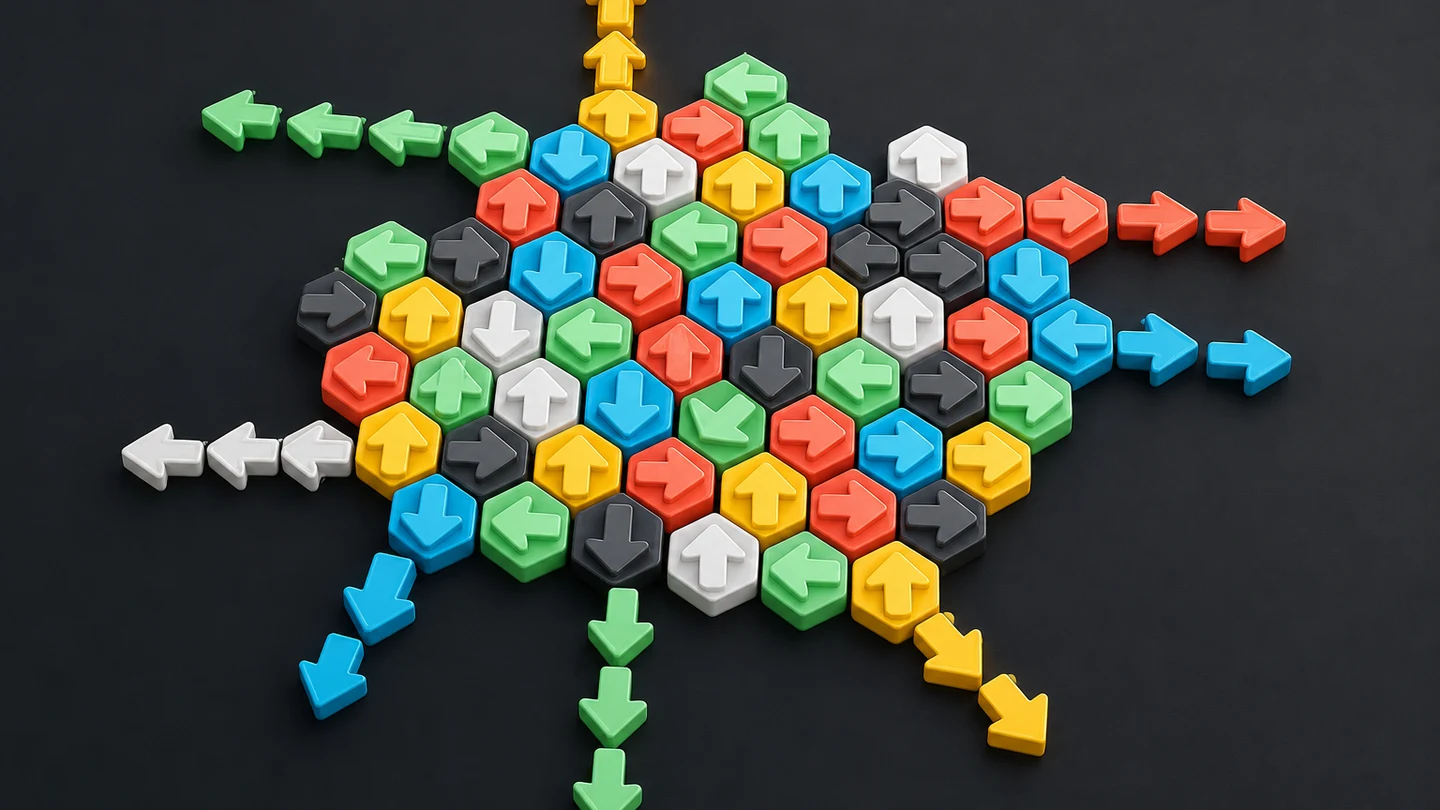
Arrow Puzzle is a relaxing but deep logic game about direction, space, and sequence. The board is filled with arrows, each pointing up, down, left, or right. Tap an arrow and it slides off the board in the direction it faces, but only when nothing blocks its path. Clear every arrow to win. The rule takes a few seconds to understand. The puzzles take much longer to master, because each removal changes what the remaining arrows can do.
The campaign spans 120 hand-tuned levels. Early boards are small and gentle, teaching you how to read clear paths and blocked paths. Later levels grow the grid, add winding multi-cell arrows, and introduce irregular silhouettes such as hearts, stars, apples, and hexagons that reshape the open space. A Daily Challenge mode generates a fresh puzzle every day with its own leaderboard, so there is always something new to solve alongside the campaign.
How to play
Every arrow on the board points in one of four directions: up, right, down, or left. An arrow can leave the board only in its own pointing direction. To remove it, tap the tile when the straight line between it and the edge is clear of other arrows. Empty cells and missing cells in irregular shapes are open air, not obstacles. Another arrow anywhere along that line blocks the exit, even if that arrow points somewhere else.
Begin by scanning the outer edges. A left-facing arrow at the far left of its row is immediately available. A down-facing arrow at the bottom of its column is also clear. When you tap a free arrow, it slides off and the occupied cells disappear. That removal can unblock another arrow behind it, which is where the puzzle becomes interesting. One correct tap often opens several new possibilities at once.
If you tap a blocked arrow, it shakes and counts as a mistake. The game does not end on a mistake, so use the feedback as a signal to reassess rather than rush. You have three hearts per level. A wrong tap on an arrow you have not already marked wrong costs a heart. Lose all three and the level ends, but you can restart instantly and try a different approach. The hearts system encourages careful observation without turning the game into a punishment.
Each level also gives you three hints. A hint highlights an arrow that is currently free to move, giving you a nudge when you are stuck. Hints are best saved for moments when you have genuinely scanned the board and reached a standstill, because the satisfaction of spotting a clear path yourself is part of the experience. An undo button lets you reverse your most recent move, useful for testing a sequence without committing to it.
The campaign unlocks levels in order. Completed levels stay available for replay, so you can return to an earlier board to improve your time, reduce mistakes, or attempt a cleaner route. Your best result for each level is saved locally, and you can submit it to the level leaderboard to see how your run compares with other players.
Arrow shapes and why they matter
Arrows are not always single tiles. Many arrows span multiple cells, forming paths that may be straight or winding. A straight arrow of length three occupies three cells in a row and exits along its own direction. A winding arrow may bend once or twice, and its head determines which way it travels off the board. The body of the arrow simply retraces the head's vacated track, so only the head's exit lane needs to be clear.
This multi-cell design is what gives Arrow Puzzle its depth. On a crowded board, a long winding arrow may have its head blocked by a short straight arrow that is itself blocked by something else. Removing the blocker frees the long arrow, which in turn clears several cells and may open a cascade of exits. Recognizing these dependency chains is the core skill, and it becomes second nature after the first few levels.
At higher difficulty levels, arrows get shorter on average, which means more separate pieces on the same grid. A 14 by 14 board with short arrows can hold over a hundred individual paths, each with its own exit direction and its own place in the dependency chain. The board becomes a dense web of interlocking constraints, and solving it feels like untangling a knot one strand at a time.
Board shapes and irregular silhouettes
The grid is not always a plain square. Arrow Puzzle cycles through nine distinct silhouettes across the campaign: full grid, diamond, circle, heart, star, triangle, hexagon, apple, and plus. Each shape removes certain cells from the board, creating negative space that arrows can travel through but never occupy. A heart-shaped board has rounded shoulders where arrows exit through curved edges. A plus-shaped board has four narrow arms that channel arrows into tight corridors.
Irregular shapes change the strategy without changing the rules. An arrow whose path reaches a gap can continue through it toward the outside, so missing cells are not walls but shortcuts. Learning to read negative space is one of the most useful skills in the game. A star-shaped board may look intimidating at first glance, but its pointed tips often provide easy exits that a square board of the same size would not offer.
The shape cycle ensures that every level feels visually distinct. You will see the same nine silhouettes repeat at increasing sizes and difficulties, so a heart board at level 4 with a 4 by 4 grid is a gentle introduction, while a heart board at level 58 with a 14 by 14 grid is a serious challenge. The combination of shape, size, arrow count, and winding probability gives each level its own personality.
Difficulty progression across 120 levels
The campaign is divided into four bands. Levels 1 through 10 are the starter phase, using 4 by 4 and 5 by 5 grids with short straight arrows and no winding paths. These levels teach the core rule: find a clear path, tap the arrow, watch it leave. The small boards make it easy to see every dependency at a glance.
Levels 11 through 30 are the medium phase. Grid sizes grow from 7 by 7 to 10 by 10, arrows get slightly longer, and about a quarter of them may bend once. You start encountering situations where a single removal opens a chain of three or four new exits, and the board changes faster than it did in the starter levels. This is where most players develop the habit of scanning edges before examining the interior.
Levels 31 through 60 are the advanced phase. Grids reach 10 by 10 to 14 by 14, arrows can be up to five cells long with multiple bends, and over half of them wind through the board. The dependency chains become longer and less obvious. A blocked arrow at the center might depend on a removal at the edge that itself depends on a third arrow in a different corner. This is where the guide grid and zoom features become genuinely useful.
Levels 61 through 120 are the expert phase. Grids grow to 15 by 15, 16 by 16, and finally 20 by 20, with short intertwined arrows and an 80 percent winding probability. A 20 by 20 board can hold over 150 separate arrows, each with its own direction and place in the chain. Solving these levels requires patience, systematic scanning, and a willingness to use undo when a promising sequence turns out to be a dead end.
Daily Challenge
Beyond the campaign, Arrow Puzzle offers a Daily Challenge that generates a fresh puzzle every day. The daily puzzle uses a deterministic seed based on the date, so every player who attempts it on the same day sees the same board. Difficulty rotates through the week, with larger grids and more winding arrows on later days.
The Daily Challenge has its own leaderboard separate from the campaign. Your completion time is submitted to the server, and you can see your rank among all players who attempted that day's puzzle. A nickname system lets you pick a display name for the leaderboard. You can play the daily puzzle once per day, and your result is recorded permanently with your rank and personal best.
The daily mode uses the same hearts and hint rules as the campaign, but the board is always a fresh generation rather than a hand-tuned level. This means the difficulty comes from the puzzle's parameters rather than from deliberate design, and the experience is more about adaptable problem-solving than memorized routes.
Controls and accessibility
Arrow Puzzle is built for both desktop and mobile. On a desktop, click an arrow to attempt its exit. Use the mouse wheel to zoom in or out over the board, and drag to pan when zoomed in. On a touch screen, a single deliberate tap selects an arrow. Pinch with two fingers to zoom, and drag with one finger to pan when the board is enlarged. A guide grid toggle overlays alignment lines to help you trace paths on dense boards.
The game supports several accessibility options. Dark mode switches the palette for low-light play. High contrast increases the visual distinction between arrows and empty cells. Colorblind labels add text or symbols to arrows so that direction is not communicated by color alone. A reduced motion preference is respected for players who prefer minimal animation.
Keyboard users can navigate the board with arrow keys and activate a focused arrow with Enter or Space. The restart, hint, and undo buttons are all keyboard-accessible. The game's layout is responsive, adapting from compact mobile screens to wide desktop displays without losing functionality.
Scoring and leaderboards
Campaign levels support per-level leaderboards. When you complete a level, your result includes the level number, mistake count, completion time, and arrow count. The leaderboard ranks entries within the same level, with fewer mistakes ranking ahead of more mistakes. When two runs have the same mistake count, the faster time ranks ahead. If both values match, the earlier submitted run stays ahead. This means a zero-mistake completion remains meaningful even when another player finishes a few seconds sooner after multiple incorrect taps.
The score is derived from the same values: mistakes have a much larger effect than seconds, rewarding accuracy over speed. You can view daily, weekly, monthly, and all-time leaderboards for each level, so you can compare your result against recent attempts or the full history of that board.
Your browser keeps a local best result for each completed level, so you can track improvement before submitting anything. Submitting is optional and uses a display name or your browser identity. Sharing a result copies a link to the public Arrow Puzzle game page rather than a private solution, so friends can try the same level without seeing your route.
Coins, shop, and statistics
Completing levels earns coins. Faster completions with fewer mistakes yield more coins, and perfect clears with no wrong taps receive a bonus. Coins can be spent in the shop on arrow skins that change the visual style of the arrows on the board. Skins are cosmetic only and do not affect gameplay.
The statistics screen tracks a wide range of metrics: levels completed, current level, perfect levels, fastest time, average time, total moves, wrong taps, hints used, restarts, total play time, current streak, longest streak, current coins, lifetime coins earned, highest reward, average reward, fast finishes, and no-hint clears. These statistics give you a long-term picture of your progress and give you goals to work toward beyond simply finishing the campaign.
Beginner strategy
Start at the outer edge and make a slow scan. Check the top for up arrows, the right side for right arrows, the bottom for down arrows, and the left for left arrows. These are the most likely immediate exits because their route to the edge is shortest. Do not tap every apparent exit at once. Instead, identify one clear arrow, remove it, and then re-scan to see what changed.
After clearing the obvious edges, look for arrows that were previously blocked but are now exposed. A common pattern is an inner arrow pointing toward the edge, blocked by an edge arrow you just removed. Removing the inner arrow may in turn free a third arrow deeper in the board. Following these chains is more efficient than scanning the entire board after every move.
When the board feels stuck, resist the urge to tap randomly. Instead, trace each remaining arrow's exit path mentally. If every arrow is blocked, check whether the guide grid helps you see alignments you missed. A hint is cheaper than a lost heart, so use one if you have spent a genuine minute without finding a move.
Advanced strategy
On larger boards, zoom in to inspect dense regions. A cluster of arrows in one corner may have a dependency chain that only becomes visible at close range. Use the guide grid to confirm whether a cell is truly empty or whether a winding arrow passes through it. Remember that winding arrows retrace their own path, so their body cells do not block their own exit.
Undo is a powerful tool for exploration. If you see two possible exits but are not sure which leads to a better chain, try one, observe the result, and undo if it leads to a dead end. The game does not penalize undo, so it is always available as a safety net. However, undoing does not restore a lost heart, so it is best used before a wrong tap rather than after.
For expert-level boards with over 100 arrows, develop a systematic sweep. Divide the board into quadrants mentally, clear one quadrant's edge arrows, then move to the next. This prevents the overwhelming feeling of staring at a dense field and gives you a clear sense of progress as each region empties.
Frequently asked questions
Is Arrow Puzzle free to play?
Yes. Arrow Puzzle runs in any modern browser and the full 120-level campaign is available without installing an app or creating an account. You only need a network connection for leaderboard features and the Daily Challenge.
How many levels does Arrow Puzzle have?
The campaign has 120 levels divided into four difficulty bands: starter (1 to 10), medium (11 to 30), advanced (31 to 60), and expert (61 to 120). Each level uses a unique combination of grid size, board shape, arrow count, and winding probability. A Daily Challenge mode adds a fresh puzzle every day.
What makes an arrow clear enough to remove?
Trace a straight line from the arrow head in the direction it points. The arrow is clear when no other remaining arrow appears anywhere on that line before it reaches the edge of the board. Empty and missing cells are open space, not obstacles.
Why did my tap count as a mistake?
A mistake means another arrow was still somewhere in the selected arrow's exit path. The blocked tile stays on the board. If it is the first wrong tap on that arrow since your last correct move, it costs a heart. Look for the blocking arrow, remove it first, then return to the blocked one.
What do the different board shapes mean?
Board shapes like heart, star, diamond, and hexagon remove cells from the grid to create irregular silhouettes. Missing cells are treated as open space that arrows can travel through. The shape changes the strategy without changing the rules, and it cycles through nine distinct silhouettes across the campaign.
How does the Daily Challenge work?
The Daily Challenge generates a fresh puzzle every day using a deterministic seed based on the date. Every player who attempts it on the same day sees the same board. Your completion time is submitted to a daily leaderboard with its own ranking. You can attempt the daily puzzle once per day.
Can I replay levels I have already completed?
Yes. Completed levels stay available for replay. Replaying is useful for improving your time, reducing mistakes, attempting a perfect clear, or submitting a stronger result to the level leaderboard.
Do I need to finish the tutorial before playing level 1?
The first levels are designed as a gentle introduction, so you can start playing immediately. The game teaches the core rule through early levels rather than a separate tutorial screen.
How are leaderboard ties decided?
Campaign leaderboards first compare mistakes, then elapsed seconds, then submission time. This makes accuracy the primary measure. Daily Challenge leaderboards rank by completion time, with faster times ranking higher.
Does my progress save when I close the browser?
Your campaign progress, personal bests, coins, statistics, and settings are stored locally in your browser. You can resume later on the same device. Clearing browser data may remove this local record. Submitted leaderboard entries are stored on the server and remain separate from local progress.
What are coins for?
Coins are earned by completing levels and are spent in the shop on arrow skins that change the visual appearance of arrows on the board. Skins are cosmetic only and do not affect gameplay. Coins also serve as a progress metric on the statistics screen.
Can I play on mobile?
Yes. Arrow Puzzle is designed for touch screens with tap-to-select controls, pinch-to-zoom, and one-finger panning when zoomed in. The layout adapts to compact screens, and the guide grid helps with precise tapping on dense boards.
Trending Games

Sprunki Phase 7 Original
Sprunki Phase 7 Definitive
Sprunksters But Sprinkle
Sprunki OC With Lily
Sprunki Retake New Human
Incredibox Mustard
Sprunki Lily
Sprunki Incredibox

Sprunki Wenda Treatment Pyramixed 3.0

Sprunki Phase 16
Sprunki simon's realm